Model a 'tension only' bar
This is possible only if you have the module esas.07 – Tension only members (old protection) or sens.00 Basic nonlinear calculation (cloud protection). Follow the steps described below.
- In the Project data, on the ‘Functionality’ tab, the functionalities ‘Nonlinearity’ and ‘Beam local nonlinearity’ have to be selected:
- In the Structure menu > Model data, a new item ‘Beam – nonlinearity’ has been made available:
- The next step is to create nonlinear combinations via the Main menu > Load cases, combinations > Nonlinear combinations.
- Now the nonlinear calculation can be performed. This is an iterative calculation, during which compression will be eliminated from the ‘tension only’ bars.
- The results for the normal force - in a selection of ‘tension only’ bars - can now be viewed and compared in the Results menu:

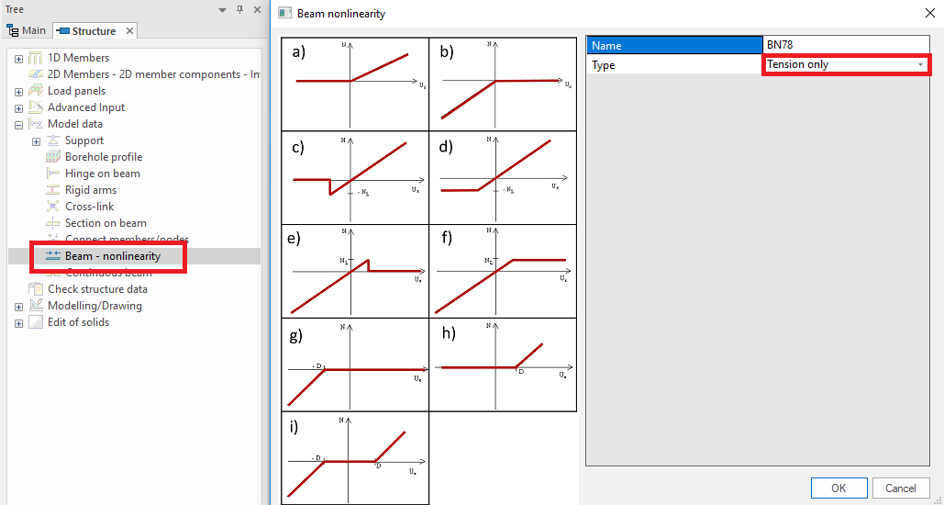
Choose for ‘Tension only’ and select the bars that should only work under tension – not under compression. Labels will appear on the selected bars, in the form of arrows.

For more information, reference is made to the FAQ ‘How to create nonlinear combinations for a nonlinear calculation?’ (FAQ ESA1203).

Result for a linear combination:

Result for a nonlinear combination (with the same load content as the linear combination):
